RSS.com podcasters can monetize their shows by providing Early Access, Exclusive, or Ad-free episodes to their fans through Apple Podcasts Subscriptions. You can publish subscriber episodes directly from your dashboard, making it easier to grow subscriptions on Apple Podcasts.
Through this direct integration with Apple Podcasts Subscriptions, podcasters can now create, upload, manage, and directly distribute their free and premium audio through their RSS.com podcast hosting account, eliminating the need to upload free and premium content through multiple dashboards.
The setup flow for Apple Podcasts Subscriptions is shorter than it used to be. There are really only two phases now: a quick bit of prep on RSS.com, and then the actual setup, which happens entirely inside Apple Podcasts Connect. Once Apple approves your subscription, you'll be able to publish premium episodes straight from your RSS.com dashboard.
On RSS.com first
Before anything else, two things need to be in place. You'll need to have added your Apple API key to RSS.com (see How to add your Apple Podcasts API key to RSS.com), and your show needs to be claimed in Apple Podcasts Connect (see How to claim your show on Apple Podcasts). With both of those sorted, RSS.com can publish subscriber episodes to Apple on your behalf, there's nothing else to configure on our side.
The rest happens in Apple Podcasts Connect
Subscriptions are set up, priced, reviewed, and approved by Apple. The full process is documented in Apple's subscription launch checklist, which walks you through it end to end. The short version is this: enroll in the Apple Podcasters Program (the annual fee Apple charges to unlock subscriptions), complete the tax and banking sections of your agreement, decide on the benefits you'll offer subscribers and a price point that works across the markets you sell in, upload the subscription artwork Apple requires, and submit the subscription for review. Apple's review usually takes about a working day, so don't leave it until the last minute.
Important: Apple asks you to declare your trader status under the Digital Services Act. You'll find it in Podcasts Connect under Business, next to the tax and banking sections, shown as Complete Compliance Requirements. Do this before you publish any premium episodes. Until it's declared, Apple rejects ad-free, early access and subscriber-only episodes, and the episode fails to publish. Apple explains who counts as a trader on Manage Digital Services Act compliance information. Your regular episodes are not affected, they reach Apple Podcasts through your feed as usual.
After Apple approves
Once your subscription goes live and is approved by Apple, you'll see the status of the Subscription turn green:
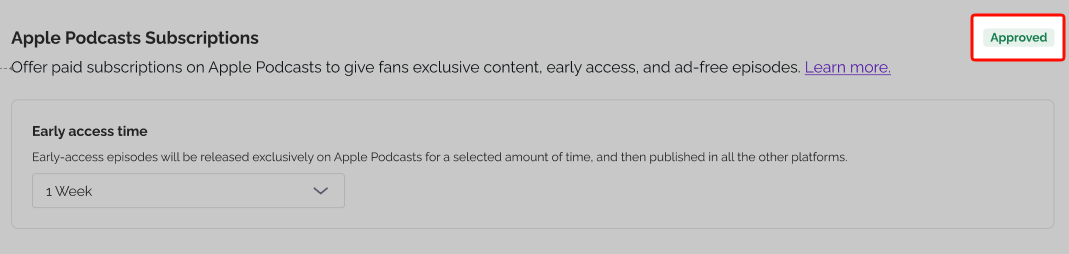
From now on, you can publish premium episodes directly from your RSS.com dashboard, they'll be delivered to Apple Podcasts as subscriber-only content automatically. You keep 70% of the subscription revenue during a listener's first year and 85% from year two onward, paid out by Apple.
Note: An approved subscription does not cover the trader declaration. They are two separate steps in Podcasts Connect, so your subscription can show green while the declaration is still outstanding, and premium episodes will keep failing to publish. If that happens, open Business in Podcasts Connect and check Complete Compliance Requirements. My episode failed to publish covers what to do with the episode that errored.
If you're still deciding what to offer subscribers, Early Access, Exclusive, or Ad-free episodes is a good place to start.
By setting up Apple Podcasts Subscriptions for your podcast, you can earn monthly revenue and your listeners can support your content.
Was this article helpful?
That’s Great!
Thank you for your feedback
Sorry! We couldn't be helpful
Thank you for your feedback
Feedback sent
We appreciate your effort and will try to fix the article