iHeartRadio takes submissions through its own podcaster portal. Copy your RSS feed from RSS.com, submit it at iHeartRadio, then paste your iHeartRadio show URL back into RSS.com.
Important: iHeartRadio only accepts submissions from the United States, Canada, Mexico, Australia and New Zealand. If you are somewhere else, the portal will not let you submit, and there is nothing we can change on our side to open it up.
Submit your show
- Open the Distribution tab of your podcast, go to Other Directories (Guided Submission) and expand iHeartRadio. Click Copy your RSS feed.
- Go to podcasters.iheart.com and click Get Started under "Submit Your Podcast".
- Sign in with your iHeartRadio account, or create one for free.
- Paste your feed at the Enter Podcast RSS step.
- Check your show details, accept the terms, and submit.
iHeartRadio does not publish a review timeline. See how long directories usually take for what to expect.
If you get an error about your email address
iHeartRadio checks the email address in your RSS feed to confirm the show is yours. RSS.com hides that address by default so spammers cannot scrape it, so you may see this:
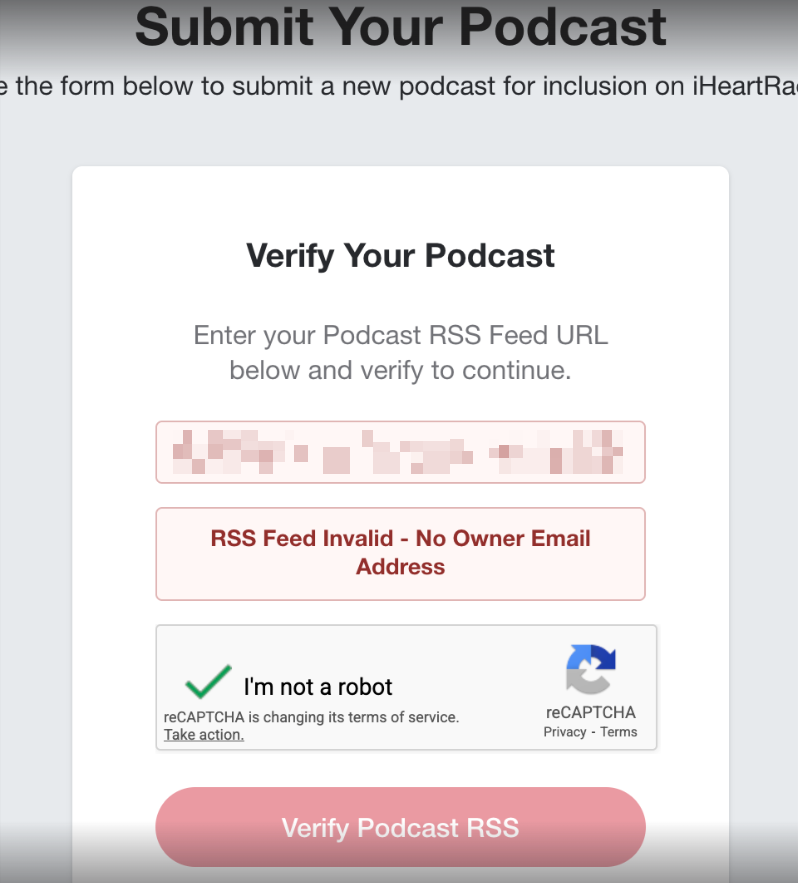
Turn the email on, submit, and it hides itself again after 12 hours. See how to enable the email address in the RSS feed.
Add your iHeartRadio link back to RSS.com
Once your show is live on iHeartRadio, copy its public URL and paste it into the iHeartRadio field in Other Directories (Guided Submission), then click Save changes. This adds an iHeartRadio button to your public podcast page on RSS.com. See how to find your iHeartRadio URL.
Note: this step is only about the button on your RSS.com page and the status shown in your Distribution tab. Your episodes reach iHeartRadio through your RSS feed, so they keep arriving whether or not you paste the link. If you skip it, your Distribution tab will keep showing the show as not submitted.
Related
Was this article helpful?
That’s Great!
Thank you for your feedback
Sorry! We couldn't be helpful
Thank you for your feedback
Feedback sent
We appreciate your effort and will try to fix the article