The Alternate Enclosure, Soundbites, TXT, and Live Item, are Power-Ups that can be enabled under the Settings tab.

The alternate enclosure lets you attach extra media files to a single episode (e.g., video + low-bandwidth audio). Players that support the tag can offer a toggle or auto-pick the best version; players that don’t will just use your main audio.
It’s backward-compatible and ideal for video, poor-connectivity regions, alternative codecs, or language variants.
What is an “alternate enclosure”?
In RSS, an enclosure is the primary media file for an episode. The alternate enclosure tag adds additional versions or companion media to that same episode, like a video stream, a smaller audio file, or a different codec. It’s designed to keep one unified feed while offering format choice to listeners and apps.
Common uses
Audience behavior is hybrid: many switch between audio and video depending on context. Offering both in one feed increases reach and improves UX.
- Video version of your episode (same content, different format).
- Low-bandwidth audio (e.g., 64 kbps) for areas with poor connectivity.
- Alternative codecs / delivery (e.g., Opus, HLS streaming) for better device support and adaptive playback.
How it works (compatibility)
On the player side, supporting apps may show a choice (e.g., “Watch” or “Listen – low data”) or automatically select the best version. Non-supporting apps, safely ignore alternates and play your main enclosure, no breakage.
Set-up in RSS.com
- Create or open the episode you want to edit.
- Scroll down to the Alternate Enclosure section.
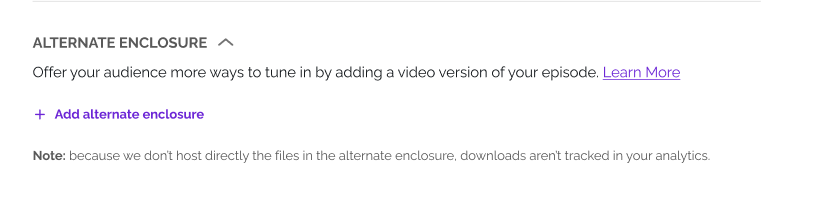
3. Click Add alternate enclosure and paste a URL for the extra version. Keep in mind that these files must be stored externally. RSS.com won't host these files.
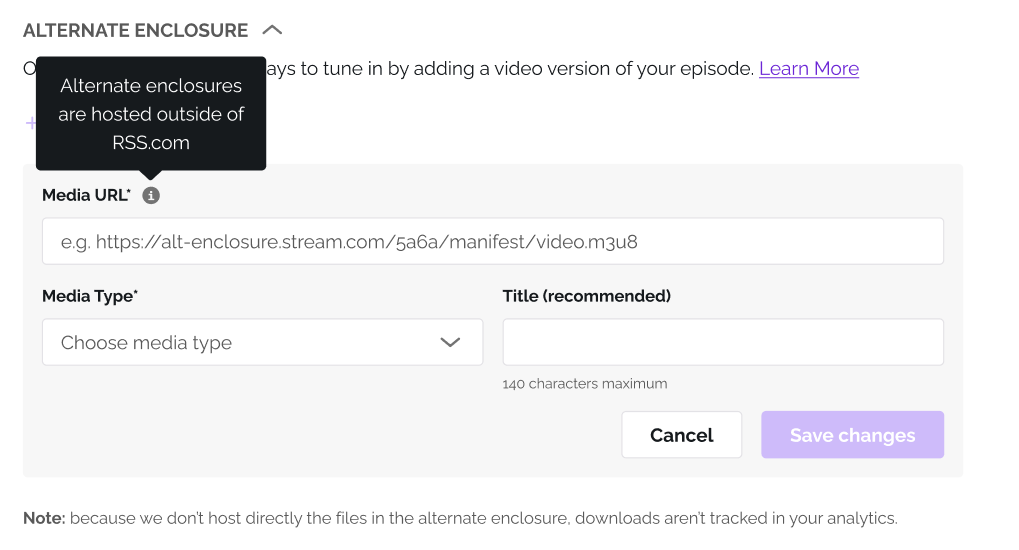
4. Give it a title and select the corresponding media type.
5. Save Changes, Save the Episode, and you're done. Your feed now advertises multiple versions for the same episode. Supporting apps will surface them; others will play the main audio.
Best practices
- Keep main enclosure the audio for widest compatibility.
- Prefer HLS for video (adaptive bitrate > giant downloads).
- Match content: titles, duration, chapters across versions to make switching seamless.
- Label clearly: “Video (1080p)”, “Audio - Low bandwidth”, “ES Audio”.
- Mind file size (faster starts, fewer abandons).
- Test in multiple players (confirm toggles, playback, and analytics events).
FAQs
❓ Do I need a separate video feed?
No. The point of alternate enclosure is one feed with multiple versions. Some creators may still keep a separate video strategy (e.g., YouTube), but it’s not required for open RSS delivery.
❓ Will every app show a video/audio toggle today?
Not yet. Support is growing (e.g., HLS via alternate enclosure is already demoed in real apps), but it’s not universal. Keep in mind that non-supporting apps keep working with your main audio.
❓ What formats work best for video?
Use HLS for adaptive streaming when possible.
❓ Will these enclosures be tracked in my analytics?
No. Because we don’t host directly the files in the alternate enclosure, downloads aren’t tracked in your analytics.
❓ Can I add more than one alternate?
Yes, multiple alternates (e.g., video + low-bandwidth audio + alt codec) are supported by the spec.
❓ Is this future-proof?
Alternate enclosure is part of the evolving Podcasting 2.0 namespace, which prioritizes backward compatibility as it matures.
Was this article helpful?
That’s Great!
Thank you for your feedback
Sorry! We couldn't be helpful
Thank you for your feedback
Feedback sent
We appreciate your effort and will try to fix the article