Most people listen to podcasts in an app, so Apple Podcasts and Spotify usually sit at the top of your stats. Web Downloads and Top Web Referrers cover the rest: the plays that happen in a browser, and which websites sent those listeners to you.
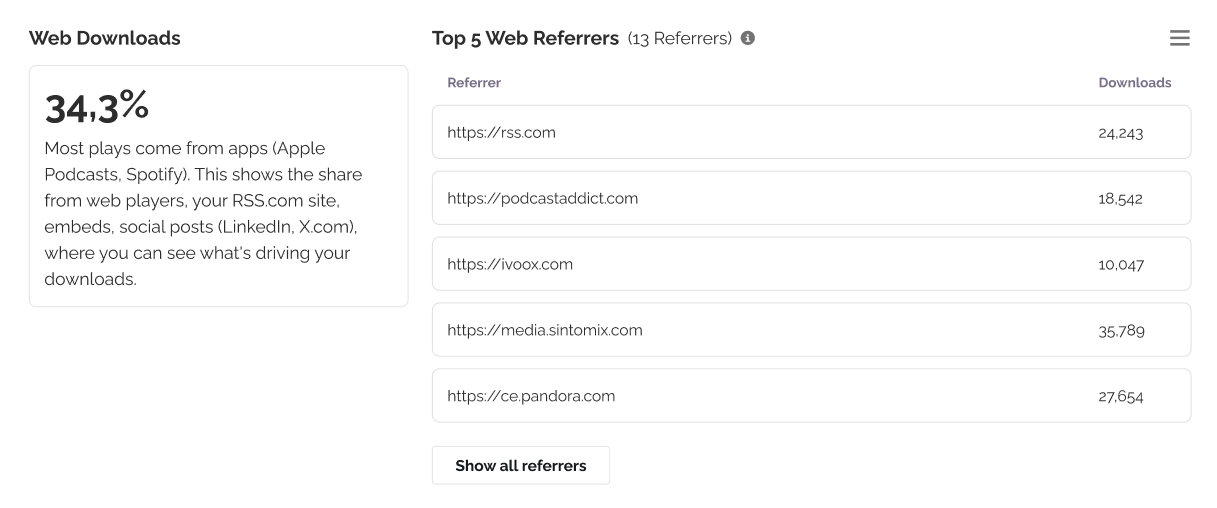
Both charts are on the Overview tab of your Analytics page.
Web Downloads
Web Downloads shows what share of your downloads came from a browser rather than an app. That includes:
- The player on your RSS.com podcast site
- Players you have embedded on your own website
- Links opened from social posts, for example LinkedIn or X.com
Use it to size the channel. If web is a small slice, your audience is app-first and your effort is better spent on directories. If it is a large slice, the next chart tells you which sites are doing the work.
Top Web Referrers
Top Web Referrers lists the websites that sent listeners to your web-played episodes. Each row is one site, with the number of downloads it drove.
Click Show all referrers to open the full list, which you can export as a CSV. Scroll to the end of the list before you export, so the CSV includes every row.
How to read it
Your embedded player reports the page it is embedded on, not RSS.com. So if you put the player on yoursite.com, you will see yoursite.com in the list. That is what makes the chart useful, because it tells you which of your own sites are converting. The list shows each site once, not its individual pages.
Not every site passes referrer information. Some browsers and apps strip it, and some links arrive with nothing attached. This is a partial view of your web traffic rather than a complete one. It is still enough to see which channels are actually driving downloads.
Important: Referrers only apply to web plays. A download from Apple Podcasts or Spotify has no referring website, so it will not appear here. Those apps show up in Apps, podcast directories, and browsers instead.
Which plans include these charts
Web Downloads is on every plan. Top Web Referrers shows your top referrer on every plan, and the full list, which you can export as a CSV, on Plus and above.
Related articles
Was this article helpful?
That’s Great!
Thank you for your feedback
Sorry! We couldn't be helpful
Thank you for your feedback
Feedback sent
We appreciate your effort and will try to fix the article